The mobile app for PrestaShop
Your store.Alwayswithin reach.
Manage orders, reply to customers and track sales. Wherever the day takes you.
14 days free · No credit card requiredStarts when your first store connects.


From new order to next action.
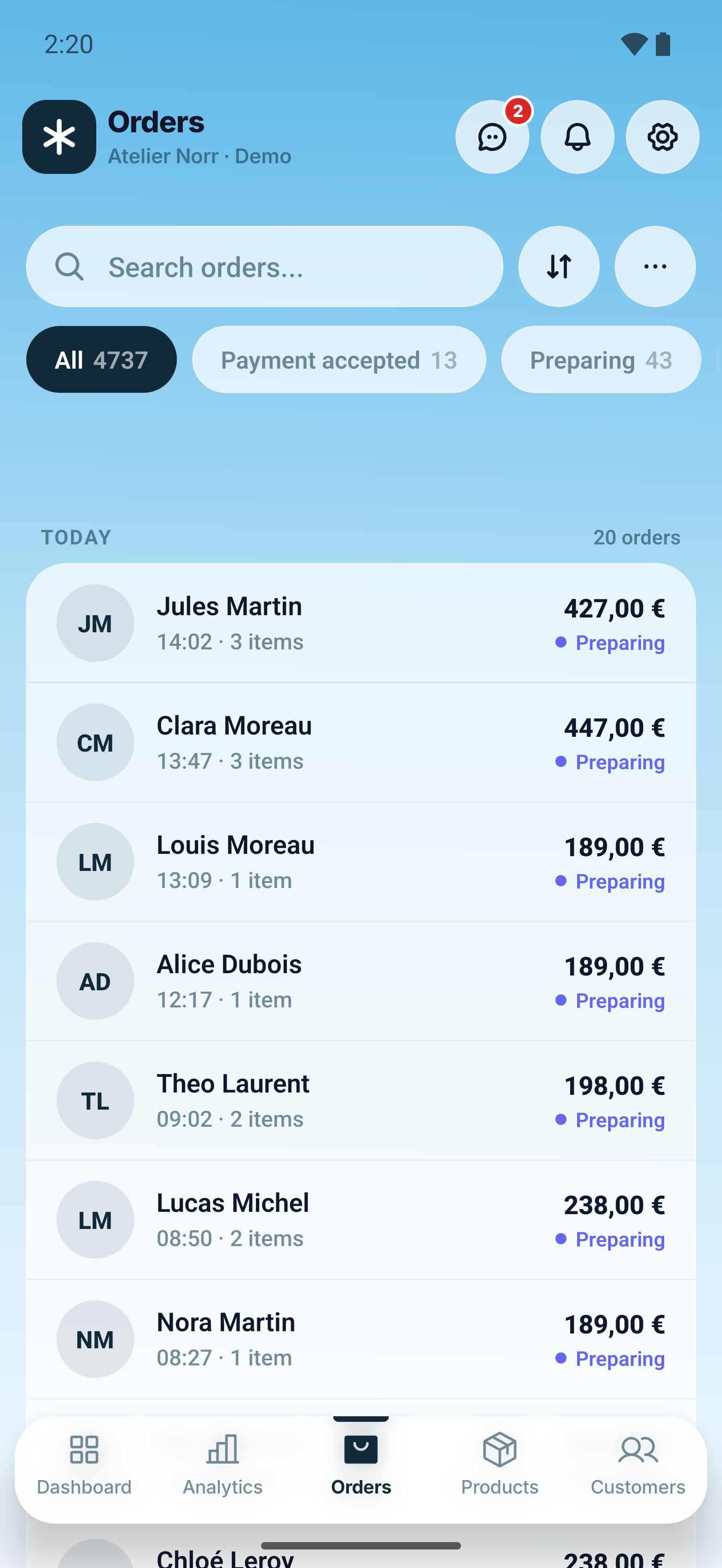
Manage your PrestaShop store from your phone.
Manage the work behind every order from your phone. Review purchased items and customer details, change order statuses and add tracking information as orders move from payment to dispatch.
Keep your catalogue up to date with changes to prices, stock levels and product availability. Customer profiles bring contact details and order history together, so you can check the context before taking the next action.
Give shoppers the answers they need to convert.
A live chat widget connects the storefront directly to the phone. Shopper questions arrive the moment they are asked and can be answered from anywhere, while the buying intent is still alive. A fast, personal answer is often all it takes to turn a hesitant visitor into a paid order.
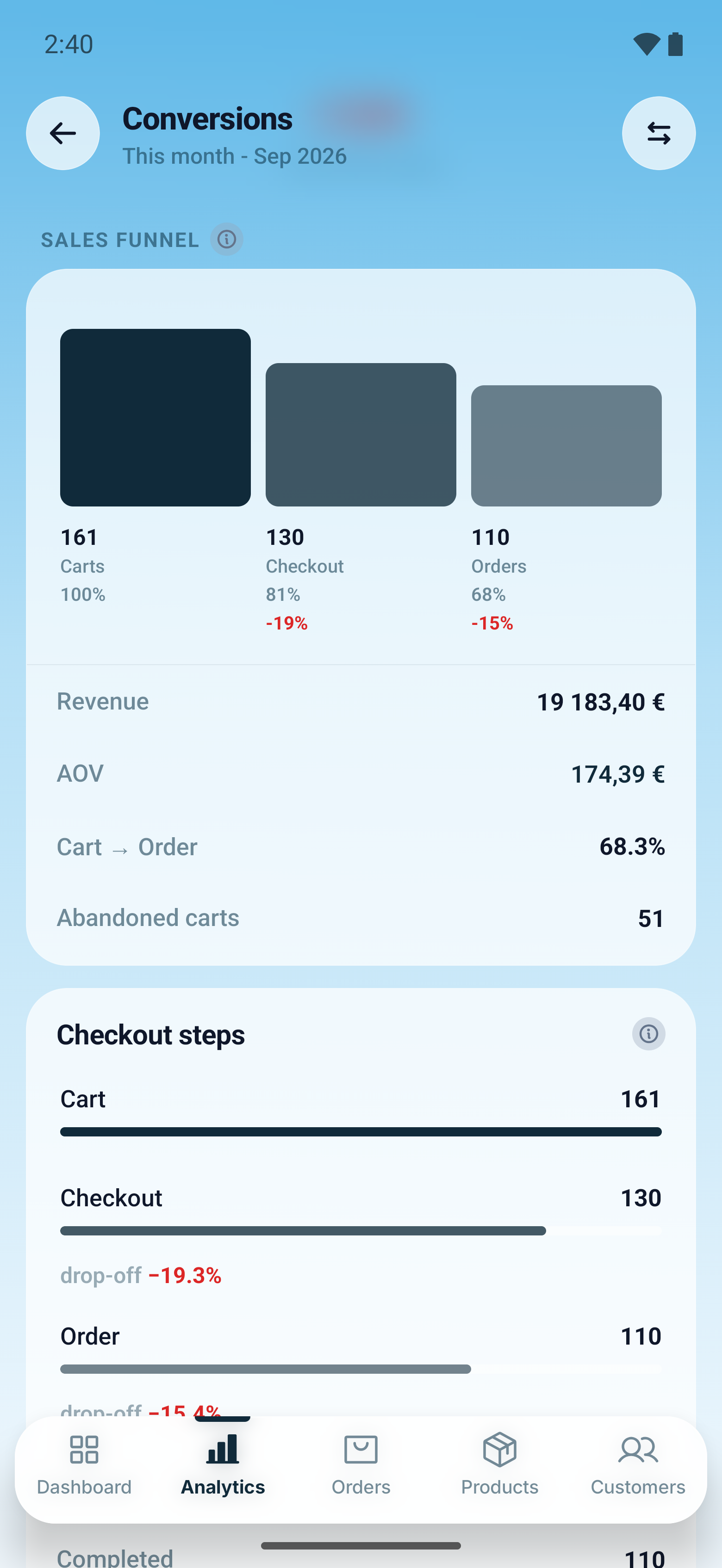
Conversion funnel
See where shoppers leave between cart and order.
Traffic sources
See which channels bring visitors and orders.
Discount analysis
See discount costs, usage and the orders behind them.
Spot the opportunities that help your business grow.
PrestaOne comes with a powerful analytics engine built in: sales statistics, traffic and conversion reports for any period. It extends native PrestaShop data by collecting the storefront signals the platform never records and connecting every one of them to real orders. The result is a clear, weighted picture of the business, ready to back real decisions.
Recover revenue from abandoned carts.
Create and manage automated reminder campaigns that bring abandoned carts back. Recovery runs on the same powerful PrestaOne analytics tool as the rest of your store. Every reminder is tracked to the order it produced, so recovered revenue is measured, not estimated. Carts that would otherwise be lost become paid orders.
Your cart is still saved. Pick up where you left off.
Order confirmed 4 h later
Keep your store data direct, private, and secure.
Orders, customers, products, analytics, and message content travel directly between the module and the app. No store business data passes through PrestaOne servers.
Designed around data minimisation and privacy by architecture.
Three steps to your first insight.
The trial begins only when your first store is connected.
Download the module
Get the PrestaOne Mobile Bridge ZIP.
Install it in PrestaShop
Upload the ZIP in Module Manager and click Install.
Connect your store
Download PrestaOne from Google Play or the App Store, then scan the QR code generated by the PrestaShop module.
Simple pricing per seat.
A seat connects one store to one device. Use them whichever way you work: several stores on one phone, or several devices on the same store.
Single
€8.33per seat / month
For one owner or a small team. Two seats cover two devices on one store, or two stores on the same device.
Multi
€7.50per seat / month
For a growing team or a portfolio of stores, kept on a single bill.
Agency
Let’s talk
For agencies running multiple client stores, with seats for their clients too.
Billed once a year: €100 or €90 per seat, ten months paid for twelve months of use. Every plan has the same features; only the number of seats changes.
* Prices exclude VAT. It is added at checkout based on your country, unless you give an EU VAT number.
Every plan includes
All of it works from the first day of the trial.
Analytics
- Revenue and orders for any period
- Visitors and conversion rate on the same dashboard*
- Day, week, month, year and custom date ranges
- Two-period comparison on every metric, with delta and direction
- Revenue composition: products, tax, shipping and discounts
- Gross and net revenue, subtotal and average order value
- Top sellers ranked by revenue and units sold
- Discount analysis split into campaign and personal discounts
- Revenue trend chart with the compared period overlaid
Traffic and conversion
- Visitors, sessions and page views*
- Traffic sources with channel performance*
- Device and country breakdown*
- Sales funnel: view, cart, checkout, paid order*
- Cart-to-order rate with drop-off at every step*
- Conversion by traffic source and attributed orders*
- New against returning customer revenue*
Order management
- Full order list with search, status filters and date ranges
- Sort by date, total or reference; saved filter chips
- Order detail: line items, totals, tax, payment and invoice
- Status changes on a single order or in bulk selection
- Carrier and tracking number updates
- Shipping and billing address editing
- Add, edit or remove order lines and quantities
- Internal notes and customer-facing order messages
Catalogue and stock
- Full catalogue with search, category and availability filters
- Sort by best selling, price, stock level or newest
- Product creation, editing and deletion
- Image upload, cover image selection and image removal
- Stock watch with weekly sales rate and cover estimate
- Active, inactive, in-stock and out-of-stock segments
Abandoned cart recovery
- Automatic reminder sequence: first, second and final email
- Escalating discount per reminder, validated so it never drops
- Auto-generated coupons: custom prefix, validity, minimum order
- Audience control: all identified customers or newsletter subscribers
- Quiet hours and a minimum cart value threshold
- Editable email templates per language
- Manual reminder for any single cart
- Recovered carts and recovered revenue reported back in the app*
- Cart detail with contents, timestamps and reminder history
Live chat and messaging
- Storefront chat widget answered from the phone
- Product context attached to the conversation
- Read receipts and agent presence
- Quick replies for repeated questions
- Image attachments in both directions
- PrestaShop order message threads with replies
Customers and CRM
- Customer directory with search and alphabetical grouping
- Lifetime spend, order count and last order date
- Active, newsletter and guest segments
- Sort by spend, order count, name or registration date
- Customer detail with full order history and addresses
- Contact and address editing
Account and security
- Several stores connected to one device, switched inside the app
- The same store on several devices, one seat each
- Push notifications per event: orders, customers, messages
- Biometric app lock with configurable auto-lock delay
- Per-person access scopes for orders, products, customers, analytics
- QR pairing with revocable device connections
- Light and dark appearance following the device
*These figures start on install day. PrestaShop never recorded them, so PrestaOne begins collecting the moment the module is in place: expect these reports to fill up over the following days rather than to show your store’s past. Everything else works with the history you already have.
Works with the store you already run.
One mobile workspace across supported PrestaShop generations.
One module across every supported generation, installed straight into your Back Office.
Connect every store you own and switch between them inside the same app. Each connected store uses one seat.
The same app on both platforms, with the same features and the same data.
What store owners usually want to know.
What exactly counts as one seat?
One person connected to one store is one paid seat. One person using two stores uses two seats, even from the same phone; two people using one store also use two. Every store you connect stays in the same app, one tap apart.
When does the free trial begin?
The trial starts when your first store is successfully connected, not when you create an account or download the module.
Is PrestaOne a PrestaShop admin app?
Yes. PrestaShop ships no official app for its back office, and PrestaOne is the admin app for the owner: orders, customers, products, sales statistics, live chat and cart recovery. It is not an app builder, which makes a shopping app for your customers instead.
Does PrestaOne work with PrestaShop 8 and 9?
Yes. One module covers PrestaShop 1.7, 8 and 9, installed straight into your Back Office, with the same app on iOS and Android.
How do I get push notifications for new orders?
Connect your store and every new order reaches your phone as a push notification the moment it is placed. You choose which events notify you: orders, customers or messages.
Do I need an API key to connect my store?
No. You scan a QR code from your Back Office and the store is connected in minutes. No webservice keys, no manual setup.
Does PrestaOne copy my store data to its servers?
No store business data passes through PrestaOne servers. Account, pairing, subscription, and minimal signaling metadata are handled separately.
Can an agency manage stores owned by different clients?
Yes. One billing account can sponsor seats for agency staff and client owners while each person receives only the intended access.